Week12: Nov 12th–Nov 16th

Highlights for the week:

  • View the BMS Public Calendar for this weeks events!
  • Tip: Use ctrl+F and enter the date (like 1st, 2nd, 3rd, 4th, etc.) to jump quickly to the Blog entry for today!
  • Some notes for Parents/Guardians who view this Blog:
    • Everything we do in this class is listed on this Blog (so students who are absent can easily find what they’ve missed and even complete it while they are absent!)
    • Nearly every assignment can be completed at home or anywhere with an internet connection (use the Paint program rather than ‘Interwrite’ where you see it on this Blog)
    • Friday’s are makeup days so students who have trouble completing assignments have this extra time every week to get caught up!
    • You can see examples of every project we do at this Public Examples Folder Link

Monday 12th:

- Part 1) Review (click-to-comment)

  1. Please check your laptop for damages and report problems to me!
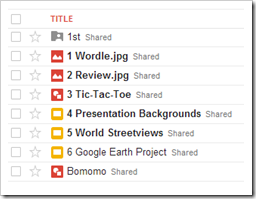
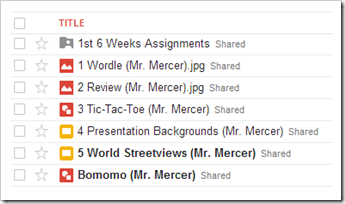
  2. Here’s what your 103 student folder should look like:
    • image
    • Daily Warmup Activity (2min timer if necessary – no talking while you complete your warmup please!)
      • Explore the Prezi at the link below and answer the following 2 questions in your warmup for today 1) Have you ever heard of Prezi before? 2) Does it look more interesting to you than PowerPoint or other slideshow programs? 
      • Here’s a sentence starter (or you can choose your own): I (have/have not) heard of Prezi before and  ___
    • Daily Warmup Response: Use the Daily Warm-up Form to record your answer
    • Check for new click-to-comments and my responses to them (blue highlights are new responses!): http://goo.gl/iA4mC

    - Part 2) Today students will… (click-to-comment)

    1. Checkout this Google Storybuilder Demo 
    2. View Prezi Intro and Tutorial Video clips
    3. Create an account at Prezi.com
    4. Explore this Demo Intro to Prezi as a class: http://prezi.com/lrevacgsnqr9/intro-to-prezi/
    5. Create your own Practice Prezi (name it Practice Prezi)
      • Open the Process Template
      • Experiment with the Features of Prezi
      • Try other themes
      • Create more Prezis using different themes

    - Part 3) Help with today’s assignments! - (click-to-comment)

    1. Use the Intro to Prezi to help with the toolbar functions

    - Part 4) Through? (click-to-comment)

    1. Checkout this Kaleidoscope Painter

      Tuesday 13th:

      - Part 1) Review (click-to-comment)

      1. Please check your laptop for damages and report problems to me!
      2. Here’s what your 103 student folder should look like:
        •  image
        • Daily Warmup Activity (2min timer if necessary – no talking while you complete your warmup please!)
          • Explore the Prezi at the link below, and in your warmup for today tell me 1) if you like it and 2) what you think might make it better 
          • Here’s a sentence starter (or you can choose your own): I (liked/didn’t like) the Prezi and I think ___
        • Daily Warmup Response: Use the Daily Warm-up Form to record your answer
        • Check for new click-to-comments and my responses to them (blue highlights are new responses!): http://goo.gl/iA4mC

        - Part 2) Today students will… (click-to-comment)

        1. Open this Prezi to help you with today’s assignments (I’ll be projecting it in class)
        2. Create a new folder in your 103 Student Folder called 2nd and move all assignments from the 2nd 6 Weeks into that 2nd folder 
          •  image
        3. Experiment with the Kaleidoscope Painter 
        4. Create a new Prezi called Practice2 

        - Part 3) Help with today’s assignments! - (click-to-comment)

        1. Use this Prezi to help you with today’s assignments 

        - Part 4) Through? (click-to-comment)

        1. Experiment some more with the Kaleidoscope Painter

          Wednesday 14th:

          - Part 1) Review (click-to-comment)

          1. Please check your laptop for damages and report problems to me!
          2. Here’s what your 103 student folder should look like:
            • image
            • Daily Warmup Activity (2min timer if necessary – no talking while you complete your warmup please!)
            • Daily Warmup Response: Use the Daily Warm-up Form to record your answer
            • Check for new click-to-comments and my responses to them (blue highlights are new responses!): http://goo.gl/iA4mC
            • Here are the results of last week’s reflection questions:
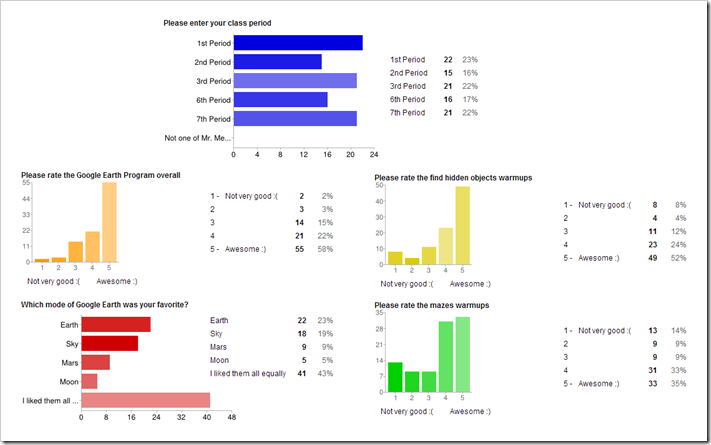
             image

              - Part 2) Today students will… (click-to-comment)

              1. Experiment with the sites below  (if any are clocked, just move to the next one on the list; they should all be open soon though)
              2. Begin your 1st Project of the 3rd 6 Weeks 
              3. Complete yesterday’s Practice2 Snowflakes Prezi

              - Part 3) Help with today’s assignments! - (click-to-comment)

              1. Here is the Prezi which will help you with today’s new project assignment 
              2. …and the Prezi which will help you with yesterday’s assignment

              - Part 4) Through? (click-to-comment)

              1. Continue to explore any of these sites

                Thursday 15th:

                - Part 1) Review (click-to-comment)

                1. Please check your laptop for damages and report problems to me!
                2. Here’s what your 103 student folder should look like:
                  • image
                  • Daily Warmup Activity (2min timer if necessary – no talking while you complete your warmup please!)
                  • Daily Warmup Response: Use the Daily Warm-up Form to record your answer
                  • Check for new click-to-comments and my responses to them (blue highlights are new responses!): http://goo.gl/iA4mC

                    - Part 2) Today students will… (click-to-comment)

                    1. Explore Google Search Stories 
                    2. Continue working on your 1 My Animations project Prezi
                      • Check the help section below for links 

                    - Part 3) Help with today’s assignments! - (click-to-comment)

                    1. Here is the Prezi which will help you with your 1 My Animations project assignment

                    - Part 4) Through? (click-to-comment)

                    1. Continue to explore any of these sites

                      Friday 16th: Folder checks every Friday!

                      - Part 1) Review (click-to-comment)

                      1. Please check your laptop for damages and report problems to me!
                      2. Here’s what your 103 student folder should look like:
                        • image
                        • Friday Warmup Activity (2min timer if necessary – no talking while you complete your warmup please!)
                          • Please complete the Weekly Reflections Form for this week! Please write 3 complete sentences in the big blocks of the form to get full credit!
                        • Friday Warmup Response:
                        • Check for new click-to-comments and my responses to them (blue highlights are new responses!): http://goo.gl/iA4mC

                          - Part 2) Today students will… (click-to-comment)

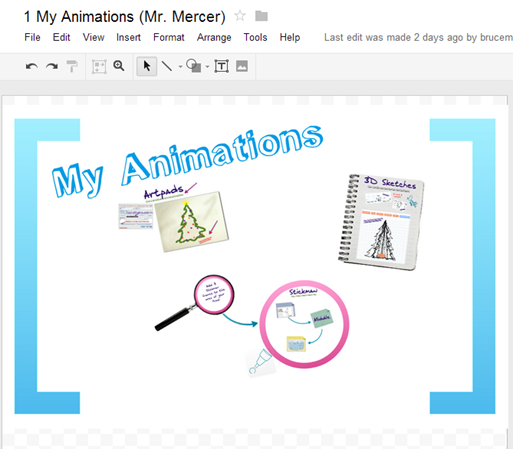
                          1. Complete your first project of the 3rd 6 Weeks - 1 My Animations project Prezi  
                            • See the help section below
                          2. Folder checks to see how your projects are going!
                          3. View the Friday video clips selection for this week

                          - Part 3) Help with today’s assignments! - (click-to-comment)

                          1. Here is the Prezi which will help you with your 1 My Animations project assignment

                          - Part 4) Through? (click-to-comment)

                          1. Have a Great Thanksgiving Break!!! 

                          Week11: Nov 5th–Nov 9th

                          Highlights for the week:

                          • View the BMS Public Calendar for this weeks events!
                          • Tip: Use ctrl+F and enter the date (like 1st, 2nd, 3rd, 4th, etc.) to jump quickly to the Blog entry for today!
                          • Some notes for Parents/Guardians who view this Blog:
                            • Everything we do in this class is listed on this Blog (so students who are absent can easily find what they’ve missed and even complete it while they are absent!)
                            • Nearly every assignment can be completed at home or anywhere with an internet connection (use the Paint program rather than ‘Interwrite’ where you see it on this Blog)
                            • Friday’s are makeup days so students who have trouble completing assignments have this extra time every week to get caught up!
                            • You can see examples of every project we do at this Public Examples Folder Link

                          Monday 5th:

                          - Part 1) Review (click-to-comment)

                          1. Please check your laptop for damages and report problems to me!
                          2. This is the last week of the 2nd 6 weeks grading period.  Check your grades in all of your classes throughout the week to make sure you have completed all of your assignments!
                          3. There’s a Pep Rally today!  :)  Here’s the Bell Schedule:
                          4. image
                          5. Here’s what your 103 student folder should look like:
                            • image
                            • Daily Warmup Activity (2min timer if necessary – no talking while you complete your warmup please!)
                            • Daily Warmup Response: Use the Daily Warm-up Form to record your answer
                            • Check for new click-to-comments and my responses to them (blue highlights are new responses!): http://goo.gl/iA4mC

                            - Part 2) Today students will… (click-to-comment)

                            1. Explore Google Earth using the kmz file below 
                              • Click here and save the Local Places fall2012 kmz file to your desktop
                              • Double-click on the Local Places fall2012 kmz file to open it in Google Earth
                            2. Create a new presentation in your 103 Student Folder called 6 Google Earth Project 
                              • View my example presentation here: http://goo.gl/6dKPY
                              • Your first two slides (1&2) should look something like this:
                              • Follow the directions on the project page in the help section below!

                            - Part 3) Help with today’s assignments! - (click-to-comment)

                            1. For help with this project, please use the project page link below

                            - Part 4) Through? (click-to-comment)

                            1. Check your grades in all subject areas! This is the last week of the 2nd 6 weeks grading period. 

                              Tuesday 6th:

                              - Part 1) Review (click-to-comment)

                              1. Please check your laptop for damages and report problems to me!
                              2. Here’s what your 103 student folder should look like:
                                • image
                                • Daily Warmup Activity (2min timer if necessary – no talking while you complete your warmup please!)
                                • Daily Warmup Response: Use the Daily Warm-up Form to record your answer
                                • Check for new click-to-comments and my responses to them (blue highlights are new responses!): http://goo.gl/iA4mC

                                - Part 2) Today students will… (click-to-comment)

                                1. Please provide feedback today on the Chrome Browser which we should all be using now (Start/Programs/Google Chrome).  Use (click-to-comment) to send me your comments about how well it works for you and what you like or don’t like about it!
                                2. Explore Google Sky using the kmz file below
                                  • Click here and save the SkyTour kmz file to your desktop
                                  • Double-click on the SkyTour kmz file to open it in Google Sky
                                  • Make sure you switch to Sky Mode to view the tour
                                  • image 
                                3. Continue working on your 6 Google Earth Project Presentation 
                                  • View my example presentation here: http://goo.gl/6dKPY
                                  • add the next two slides (3&4) on Sky which should look like this:

                                  • Follow the directions on the Project Page in the Help section below 

                                - Part 3) Help with today’s assignments! - (click-to-comment)

                                1. For help with this project, please use the project page link below

                                - Part 4) Through? (click-to-comment)

                                1. Check your grades in all subject areas! This is the last week of the 2nd 6 weeks grading period. 

                                  Wednesday 7th:

                                  - Part 1) Review (click-to-comment)

                                  1. Please check your laptop for damages and report problems to me!
                                  2. Here’s what your 103 student folder should look like:
                                    • image
                                    • Daily Warmup Activity (2min timer if necessary – no talking while you complete your warmup please!)
                                      • The winning times from yesterday’s maze were in the 30-40 second range.  Lower times were posted, but those were not on the first try or the timing began after the maze was partially completed.  We’ll try this again another time and I’ll run 1 clock and provide a link so that nobody can complete it unfairly :)
                                      • Explore the Google Election Results Map at the link below.  In your warmup, please tell me how you feel about the results of the election! 
                                      • Here’s a sentence starter (or you can choose your own): I feel  ___
                                    • Daily Warmup Response: Use the Daily Warm-up Form to record your answer
                                    • Check for new click-to-comments and my responses to them (blue highlights are new responses!): http://goo.gl/iA4mC

                                      - Part 2) Today students will… (click-to-comment)

                                      1. Explore Google Mars using the kmz file below (view Mars demo video clip
                                        • Click here and save the MarsTour kmz file to your desktop
                                        • Double-click on the MarsTour kmz file to open it in Google Mars
                                        •  
                                      2. Continue working on your 6 Google Earth Project Presentation
                                        • View my example presentation here: http://goo.gl/6dKPY
                                        • add the next two slides (5&6) on Mars which should look like this:
                                      3.  

                                      - Part 3) Help with today’s assignments! - (click-to-comment)

                                      1. For help with this project, please use the project page link below

                                      - Part 4) Through? (click-to-comment)

                                      1. Check your grades in all subject areas! This is the last week of the 2nd 6 weeks grading period. 

                                        Thursday 8th:

                                        - Part 1) Review (click-to-comment)

                                        1. Please check your laptop for damages and report problems to me!
                                        2. Here’s what your 103 student folder should look like:
                                          • image
                                          • Daily Warmup Activity (2min timer if necessary – no talking while you complete your warmup please!)
                                            • Use this timer link (multi-funtion timer – click on the green ‘up’ arrow) to time how long it takes you to solve the maze at the link below. Capture the maze with IW and use the highlighter to mark your path through it.
                                            • Here’s a sentence starter (or you can choose your own): I was able to solve the maze in ___
                                          • Daily Warmup Response: Use the Daily Warm-up Form to record your answer
                                          • Check for new click-to-comments and my responses to them (blue highlights are new responses!): http://goo.gl/iA4mC

                                            - Part 2) Today students will… (click-to-comment)

                                            1. Answer this question
                                              • Why do you think we should (or should not) explore the Moon, Mars or other planets we can reach?
                                              • Use (click-to-comment) to send me your answer
                                            2. Explore Google Moon using the Apollo Missions and any other Layers of your choice and view the following related video clips
                                              • Moon demo video clip
                                              • Kaguya satellite imagery
                                              • Apollo video restoration project
                                              • Google Earth 3D building construction
                                            3. Continue working on your 6 Google Earth Project Presentation
                                              • Add your last 2 slides (7&8) from Google Moon

                                            - Part 3) Help with today’s assignments! - (click-to-comment)

                                            1. For help with this project, please use the project page link below
                                              • Google Earth Project Page 
                                              • You do not need to download anything for your Moon slides today
                                              • Open Google Earth and switch to Moon mode
                                              • image
                                              • Slide 1 should have 3 images from the Apollo Missions Layer
                                              • Slide 2 should have 3 images from any other layer in Google Moon
                                              • image
                                            2. Your 6 Google Earth Project Presentation slides should look like this:
                                              • View my example presentation here: http://goo.gl/6dKPY
                                              • The last two slides (7&8) on Moon which should look like this:

                                              Here’s an image of all of the project slides in my example presentation:

                                              image

                                            - Part 4) Through? (click-to-comment)

                                            1. Check your grades in all subject areas! This is the last week of the 2nd 6 weeks grading period. 

                                              Friday 9th: Folder checks every Friday!

                                              - Part 1) Review (click-to-comment)

                                              1. Please check your laptop for damages and report problems to me!
                                              2. Here’s what your 103 student folder should look like:
                                                • image 
                                                • Friday Warmup Activity (2min timer if necessary – no talking while you complete your warmup please!)
                                                  • Please complete the Weekly Reflections Form for this week! Please write 3 complete sentences in the big blocks of the form to get full credit!
                                                • Friday Warmup Response:

                                                Check for new click-to-comments and my responses to them (blue highlights are new responses!): http://goo.gl/iA4mC

                                                  - Part 2) Today students will… (click-to-comment)

                                                  1. Conduct folder checks for the 2nd 6 weeks grading period
                                                  2. Complete your 8 slide 6 Google Earth Project Presentation 
                                                  3. View the Friday Video Clip selections for this week 

                                                  - Part 3) Help with today’s assignments! - (click-to-comment)

                                                  1. For help with this project, please use the project page link below

                                                  - Part 4) Through? (click-to-comment)

                                                  1. Check your grades in all subject areas!  This is the last week of the 2nd 6 weeks grading period.

                                                  Week10: Oct 29th–Nov 2nd

                                                  Highlights for the week:

                                                  • View the BMS Public Calendar for this weeks events!
                                                  • Tip: Use ctrl+F and enter the date (like 1st, 2nd, 3rd, 4th, etc.) to jump quickly to the Blog entry for today!
                                                  • Some notes for Parents/Guardians who view this Blog:
                                                    • Everything we do in this class is listed on this Blog (so students who are absent can easily find what they’ve missed and even complete it while they are absent!)
                                                    • Nearly every assignment can be completed at home or anywhere with an internet connection (use the Paint program rather than ‘Interwrite’ where you see it on this Blog)
                                                    • Friday’s are makeup days so students who have trouble completing assignments have this extra time every week to get caught up!
                                                    • You can see examples of every project we do at this Public Examples Folder Link

                                                  Monday 29th: Student Holiday

                                                    Tuesday 30th:

                                                    - Part 1) Review (click-to-comment)

                                                    1. Please check your laptop for damages and report problems to me!
                                                    2. 1 slide challenge competition
                                                      • You have the rest of this week to complete your slide
                                                      • When you’re ready to submit it, rename it  c1 Slide Challenge (the letter ‘c’ means complete and will keep the file from sorting with your other assignments.  I will search for files with this name, so if you don’t name your file correctly, it won’t show up in the search and won’t be added to the collection for voting
                                                      • Include your first name and class period somewhere on your slide (so you get credit for your work!)
                                                      • You may enter more than once if you want to try different ideas
                                                      • Voting will begin next week!
                                                      • If you have questions, comments or ideas, use (click-to-comment) to send them to me!
                                                    3. Here’s what your 103 student folder should look like:
                                                      • image
                                                      • Daily Warmup Activity (2min timer if necessary – no talking while you complete your warmup please!)
                                                      • Daily Warmup Response: Use the Daily Warm-up Form to record your answer
                                                      • Check for new click-to-comments and my responses to them (blue highlights are new responses!): http://goo.gl/iA4mC
                                                      • Here are the results of your reflections from last week:
                                                        • image

                                                      - Part 2) Today students will… (click-to-comment)

                                                      1. View the Wind Map of the USA and see if you can see the effects of the hurricane in the Northeast
                                                      2. View the Google Crisis Map for Hurricane Sandy 
                                                      3. View this State-by-state impact site from MSNBC: http://usnews.nbcnews.com/_news/2012/10/29/14781430-a-state-by-state-look-at-superstorm-sandys-impact?lite 
                                                      4. View the slideshow images from the Hurricane 
                                                      5. This week’s Project of the Week will be to create a Presentation with the name: 5 World Streetviews It should have the following:
                                                        • 7 slides (one for each continent)
                                                          1. North America
                                                          2. Asia
                                                          3. South America
                                                          4. Africa
                                                          5. Antarctica
                                                          6. Europe
                                                          7. Australia
                                                        • Each slide should have 3 labeled images from each continent and a Wordart title with the name of the continent:
                                                        • image

                                                      - Part 3) Help with today’s assignments! - (click-to-comment)

                                                      1. Information on the 7 continents and a special Google Maps link to streetview imagery from each
                                                      2. How to add Wordart:
                                                        • image
                                                      3. Here’s a link to my example presentation (which I’m still editing) in the 103 Student (Demo) folder: 

                                                      - Part 4) Through? (click-to-comment)

                                                      1. Continue to explore the hurricane information in part 2 above or the Streetview images from the 7 continents: http://www.maps.google.com/sevencontinents 

                                                        Wednesday 31st:

                                                        - Part 1) Review (click-to-comment)

                                                        1. Please check your laptop for damages and report problems to me!
                                                        2. Here’s what your 103 student folder should look like:
                                                          • image
                                                          • Daily Warmup Activity (2min timer if necessary – no talking while you complete your warmup please!)
                                                            • View the following 2 slideshows from hurricane Sandy. Choose 1 photo from each slideshow that you feel was the most significant to you, and send me the slide numbers of each in your warmup for today:  
                                                            • Here’s a sentence starter (or you can choose your own): I chose slide ___ from the first show and slide ___ from the second
                                                          • Daily Warmup Response: Use the Daily Warm-up Form to record your answer
                                                          • Check for new click-to-comments and my responses to them (blue highlights are new responses!): http://goo.gl/iA4mC

                                                            - Part 2) Today students will… (click-to-comment)

                                                            1. I’ve decided to give extra credit to anyone who completes a 1 slide challenge project (as much as a full assignment, depending on the detail in your slide).  Here are the directions again:
                                                              • 1 slide challenge competition
                                                                • Create a one slide presentation in your 103 Student Folder with best animation effects you can think of
                                                                • Here are 2 example challenges: Click here to view
                                                                • You have the rest of this week to complete your slide
                                                                • When you’re ready to submit it, rename it  c1 Slide Challenge (the letter ‘c’ means complete and will keep the file from sorting with your other assignments.  I will search for files with this name, so if you don’t name your file correctly, it won’t show up in the search and won’t be added to the collection for voting
                                                                • Include your first name and class period somewhere on your slide (so you get credit for your work!)
                                                                • You may enter more than once if you want to try different ideas
                                                                • Voting will begin next week!
                                                                • If you have questions, comments or ideas, use (click-to-comment) to send them to me!
                                                            2. View these Halloween Safety Tips! These are especially important for any of your younger siblings… help protect them (and you) by reviewing these common sense tips if you’re going out tonight!) 
                                                            3. View the Google Doodle for today: http://www.google.com/ 
                                                              • Click on each of the doors and the objects within
                                                              • Move your cursor around to discover other objects to click on
                                                            4. Continue working on your 5 World Streetviews project for this week 

                                                            - Part 3) Help with today’s assignments! - (click-to-comment)

                                                            1. I’ve added a new Project Pages Folder which will contain the information you need for each weekly project

                                                            - Part 4) Through? (click-to-comment)

                                                            1. Continue exploring the Halloween Safety Tips! These are especially important for any of your younger siblings… help protect them (and you) by reviewing these common sense tips if you’re going out tonight!) 

                                                              Thursday Nov 1st:

                                                              - Part 1) Review (click-to-comment)

                                                              1. Please check your laptop for damages and report problems to me!
                                                              2. Here’s what your 103 student folder should look like:
                                                                • image
                                                                • Daily Warmup Activity (2min timer if necessary – no talking while you complete your warmup please!)
                                                                • Daily Warmup Response: Use the Daily Warm-up Form to record your answer
                                                                • Check for new click-to-comments and my responses to them (blue highlights are new responses!): http://goo.gl/iA4mC

                                                                  - Part 2) Today students will… (click-to-comment)

                                                                  1. Explore this file World Streetviews Spreadsheet which you will need for the next step
                                                                    • If you would like to add a favorite site, send me your idea and a link using (click-to-comment) and I’ll add it with your name :)
                                                                  2. Add slide 8 to your 5 World Streetviews Presentation 
                                                                  3. Continue working on your 5 World Streetviews project for this week 

                                                                  - Part 3) Help with today’s assignments! - (click-to-comment)

                                                                  1. Use this Project Page to help you complete this week’s weekly project

                                                                  - Part 4) Through? (click-to-comment)

                                                                  1. Checkout more amazing critters at the gallery link below

                                                                    Friday 2nd: Folder checks every Friday!

                                                                    - Part 1) Review (click-to-comment)

                                                                    1. Please check your laptop for damages and report problems to me!
                                                                    2. Here’s what your 103 student folder should look like:
                                                                      • image
                                                                      • Friday Warmup Activity (2min timer if necessary – no talking while you complete your warmup please!)
                                                                        • Please complete the Weekly Reflections Form for this week! Please write 3 complete sentences in the big blocks of the form to get full credit!
                                                                      • Friday Warmup Response:
                                                                      • Check for new click-to-comments and my responses to them (blue highlights are new responses!): http://goo.gl/iA4mC

                                                                        - Part 2) Today students will… (click-to-comment)

                                                                        1. Take a Streetview Tour inside of the Whitehouse at this link: http://goo.gl/maps/UW3f7 (Thanks Joaquin!)
                                                                        2. Complete your 5 World Streetviews project for this week
                                                                          • It’s due today!
                                                                        3. Complete your 1 slide challenge extra credit project
                                                                          • Be sure to save it in your 103 Student Folder and name it c1 Slide Challenge when you’ve completed it (so I can search for it)
                                                                        4. View the Friday Video clips collection for this week

                                                                        - Part 3) Help with today’s assignments! - (click-to-comment)

                                                                        1. Use this Project Page to help you complete this week’s weekly project

                                                                        - Part 4) Through? (click-to-comment)

                                                                        1. Checkout the BISD calendar at this link.  Next week is the last week of the 2nd 6 weeks grading period!