Week15: Dec 10th–Dec 14th

Highlights for the week:

  • View the BMS Public Calendar for this weeks events!
  • Tip: Use ctrl+F and enter the date (like 1st, 2nd, 3rd, 4th, etc.) to jump quickly to the Blog entry for today!
  • Some notes for Parents/Guardians who view this Blog:
    • Everything we do in this class is listed on this Blog (so students who are absent can easily find what they’ve missed and even complete it while they are absent!)
    • Nearly every assignment can be completed at home or anywhere with an internet connection (use the Paint program rather than ‘Interwrite’ where you see it on this Blog)
    • Friday’s are makeup days so students who have trouble completing assignments have this extra time every week to get caught up!
    • You can see examples of every project we do at this Public Examples Folder Link

Monday 10th:

- Part 1) Review (click-to-comment)

  1. Please check your laptop for damages and report problems to me!
  2. Dress warmly the next few mornings… it will be very cold!
  3. image
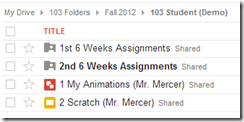
  4. Here’s what your 103 student folder should look like:
    • [image%255B9%255D.png]
    • Daily Warmup Activity (2min timer if necessary – no talking while you complete your warmup please!)
    • Daily Warmup Response: Use the Daily Warm-up Form to record your answer
    • Check for new click-to-comments and my responses to them (blue highlights are new responses!): http://goo.gl/iA4mC

    - Part 2) Today students will… (click-to-comment)

    1. Preview our Final Project: Create a collection of key applications with links so you can find them and use them in other classes in the future.  Use which ever of these 3 applications you like best to create it: Google Presentations, Prezi or Glogster 
    2. Continue working on our 2nd Glogster Project on a Positive Personality trait
      • Day3 - follow the directions on the project page: http://goo.gl/uagck 
      • When you complete your project, capture it with IW, paste it into a new Google Drawing in your 103 Student Folder and name it 4 Positive Personality

    - Part 3) Help with today’s assignments! - (click-to-comment)

    1. Click the link below for help with this project!

    - Part 4) Through? (click-to-comment)

    1. Check your grades for Progress Reports (the grading period ended Friday and you should receive the reports either Thurs or Fri)
    2. Your participation grade last week depended mostly on the contents of your 103 Student Folder, which should have 3 projects in it and should look like this:
      • [image%255B9%255D.png]

      Tuesday 11th:

      - Part 1) Review (click-to-comment)

      1. Please check your laptop for damages and report problems to me!
      2. Here’s what your 103 student folder should look like:
        • [image%255B4%255D.png]
        • Daily Warmup Activity (2min timer if necessary – no talking while you complete your warmup please!)
        • Daily Warmup Response: Use the Daily Warm-up Form to record your answer
        • Check for new click-to-comments and my responses to them (blue highlights are new responses!): http://goo.gl/iA4mC

        - Part 2) Today students will… (click-to-comment) 

        1. Preview our Final Project: Create a collection of key applications with links so you can find them and use them in other classes in the future. Use which ever of these 3 applications you like best to create it: Google Presentations, Prezi or Glogster
        2. Complete our 2nd Glogster Project on a Positive Personality trait
          • Day4 - follow the directions on the project page: http://goo.gl/uagck
          • When you complete your project, capture it with IW, paste it into a new Google Drawing in your 103 Student Folder and name it 4 Positive Personality 

        - Part 3) Help with today’s assignments! - (click-to-comment)

        1. Glogster Positive Personality Project Page:  
        2. Final Project Examples:

        - Part 4) Through? (click-to-comment)

        1. Check your grades for Progress Reports (the grading period ended Friday and you should receive the reports either Thurs or Fri)

          Wednesday 12th:

          - Part 1) Review (click-to-comment)

          1. Please check your laptop for damages and report problems to me!
          2. Here’s what your complete 103 student folder should look like:
            • [image%255B12%255D.png]
            • Daily Warmup Activity (2min timer if necessary – no talking while you complete your warmup please!)
            • Daily Warmup Response: Use the Daily Warm-up Form to record your answer
            • Check for new click-to-comments and my responses to them (blue highlights are new responses!): http://goo.gl/iA4mC

              - Part 2) Today students will… (click-to-comment)

              1. Final Project: Create a collection of key applications with links so you can find them and use them in other classes in the future. Use which ever of these 3 applications you like best to create it: Google Presentations, Prezi or Glogster
              2. Complete our Final Project
                • Google Presentation: Save the Presentation file as 5 Key sites (link to my example)
                • Prezi: Capture your Prezi with IW, paste it into a Google Drawing named 5 Key sites in your 103 Student folder, and add a link to your actual Prezi site (link to my example)
                • Glogster: Capture your Glog with IW, paste it into a Google Drawing named 5 Key sites in your 103 Student folder, and add a link to your actual Glog site (link to my example)

              - Part 3) Help with today’s assignments! - (click-to-comment)

              1. Final Project Examples:
              2. Glogster Positive Personality Project:

              - Part 4) Through? (click-to-comment)

              1. Check your grades for Progress Reports (the grading period ended last Friday and you should receive the reports either Thurs or Fri)

                Thursday 13th:

                - Part 1) Review (click-to-comment)

                1. Please check your laptop for damages and report problems to me!
                2. Here’s what your 103 student folder should look like:
                  • [image%255B12%255D.png]
                  • Daily Warmup Activity (2min timer if necessary – no talking while you complete your warmup please!)
                  • Daily Warmup Response: Use the Daily Warm-up Form to record your answer
                  • Check for new click-to-comments and my responses to them (blue highlights are new responses!): http://goo.gl/iA4mC

                    - Part 2) Today students will… (click-to-comment)

                    1. Complete our Final Project
                      • Google Presentation: Save the Presentation file as 5 Key sites (link to my example)
                      • Prezi: Capture your Prezi with IW, paste it into a Google Drawing named 5 Key sites in your 103 Student folder, and add a link to your actual Prezi site (link to my example)
                      • Glogster: Capture your Glog with IW, paste it into a Google Drawing named 5 Key sites in your 103 Student folder, and add a link to your actual Glog site (link to my example)
                    2. If you have completed everything, please help another student to complete theirs!

                    - Part 3) Help with today’s assignments! - (click-to-comment)

                    1. Final Project Examples:
                    2. Glogster Positive Personality Project:

                    - Part 4) Through? (click-to-comment)

                    1. Check your grades for Progress Reports (the grading period ended last Friday and you should receive the reports either Thurs or Fri)

                      Friday 14th: Folder checks every Friday!

                      - Part 1) Review (click-to-comment)

                      1. Please check your laptop for damages and report problems to me!
                      2. Here’s what your 103 student folder should look like:
                        • [image%255B12%255D.png]
                        • Friday Warmup Activity (2min timer if necessary – no talking while you complete your warmup please!)
                          • Please complete the final Weekly Reflections Form for this semester! 
                        • Friday Warmup Response:
                        • Check for new click-to-comments and my responses to them (blue highlights are new responses!): http://goo.gl/iA4mC

                          - Part 2) Today students will… (click-to-comment)

                          1. Complete our Final Project
                          2. If you have completed everything, please help another student to complete theirs!
                          3. View the video clips selection for this week 

                          - Part 3) Help with today’s assignments! - (click-to-comment)

                          1. Final Project Examples:
                          2. Glogster Positive Personality Project:

                          - Part 4) Through? (click-to-comment)

                          1. Check your grades for Progress Reports (the grading period ended last Friday and you should receive the reports either Thurs or Fri)

                          Week14: Dec 3rd–Dec 7th

                          Highlights for the week:

                          • View the BMS Public Calendar for this weeks events!
                          • Tip: Use ctrl+F and enter the date (like 1st, 2nd, 3rd, 4th, etc.) to jump quickly to the Blog entry for today!
                          • Some notes for Parents/Guardians who view this Blog:
                            • Everything we do in this class is listed on this Blog (so students who are absent can easily find what they’ve missed and even complete it while they are absent!)
                            • Nearly every assignment can be completed at home or anywhere with an internet connection (use the Paint program rather than ‘Interwrite’ where you see it on this Blog)
                            • Friday’s are makeup days so students who have trouble completing assignments have this extra time every week to get caught up!
                            • You can see examples of every project we do at this Public Examples Folder Link

                          Monday 3rd:

                          - Part 1) Review (click-to-comment)

                          1. Please check your laptop for damages and report problems to me!
                          2. Here’s what your 103 student folder should look like:
                            • image
                            • Daily Warmup Activity (2min timer if necessary – no talking while you complete your warmup please!)
                              • Go to this site and create some snowflakes!  http://snowdays.me/
                              • For your warmup, please evaluate the site (tell me what you like and/or don’t like about it!)  
                                • image
                              • Here’s a sentence starter (or you can choose your own): I (liked/didn’t like) ___
                            • Daily Warmup Response: Use the Daily Warm-up Form to record your answer
                            • Check for new click-to-comments and my responses to them (blue highlights are new responses!): http://goo.gl/iA4mC
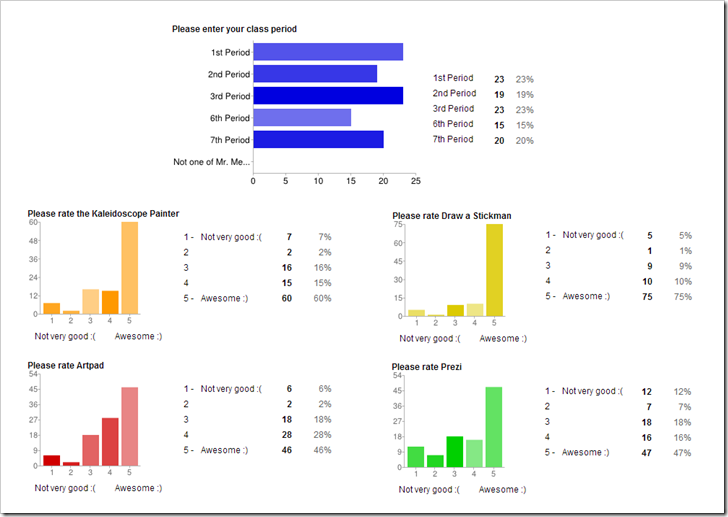
                            • Here are your results from last week’s reflection questions:
                            • image

                            - Part 2) Today students will… (click-to-comment)

                            1. View clip: ABC News intro video on Glogster
                            2. View clip: Glogster in 90 seconds
                            3. Test your logon to your Glogster account 
                            4. View video tutorials on how to add a wall, a page wall, and text to a new practice Glog called ‘About Me!’
                            5. Create a new practice Glog called ‘About Me!’ which you could use, for example, whenever you start a new class and are given an assignment to tell a little bit about yourself

                            - Part 3) Help with today’s assignments! - (click-to-comment)

                            1. An important note about Glogster EDU! 
                              • Glogster EDU accounts are created by teachers for their students, and as a result, teachers have complete control over the content and visibility of student Glogs. If you have any doubts at all about whether or not something you would like to add to a Glog is appropriate or not, choose something else that you are certain is appropriate to use instead! If you have to ask, that indicates doubt… choose something else! If I have any doubts I will remove the content of concern, or the entire Glog, or your entire account (and I sincerely hope I don’t have to do any of these!)
                            2. Glogster ‘About Me’ demo links 
                              • Glogs

                            - Part 4) Through? (click-to-comment)

                            1. Create some more snowflakes! http://snowdays.me/ 

                              Tuesday 4th:

                              - Part 1) Review (click-to-comment)

                              1. Please check your laptop for damages and report problems to me!
                              2. Here’s what your 103 student folder should look like:
                                • image
                                • Daily Warmup Activity (2min timer if necessary – no talking while you complete your warmup please!)
                                  • Try this pattern memory game (if it isn’t blocked), and if it works, please send me your score 
                                  • If the site above is blocked, try this one and send me the number you get correct instead:
                                  • Here’s a sentence starter (or you can choose your own): I scored ___
                                • Daily Warmup Response: Use the Daily Warm-up Form to record your answer
                                • Check for new click-to-comments and my responses to them (blue highlights are new responses!): http://goo.gl/iA4mC

                                - Part 2) Today students will… (click-to-comment)

                                1. View this Prezi:http://prezi.com/zmt3olg8hrnd/glogster-tools/
                                2. Make a folder in ‘my documents’ to collect and save images for your About Me Glogster project.  Copy the images from IW to paint and save them as jpg files in your new folder. You’ll need images for each of these 4 areas: 
                                  • Family (things you like to do with your family)
                                  • Favorites (places or things that are important to you)
                                  • Fun (places, things or activities)
                                  • Food (favorite foods or places to eat)
                                  • You should be able to search Google right from your Glog
                                3. View Glogster video tutorials on 
                                4. Continue working on your About Me Glog
                                  • Here’s a link to logon to Glogster:  http://edu.glogster.com/login/
                                  • Here’s a link to the nicknames list:  http://goo.gl/TnXy7
                                    • Class period+BMS+First Name+Last Initial
                                    • Example: 6BMSFirstL
                                  • When you’re done with your Glog: 
                                    • Capture it with IW
                                    • Copy/paste it into a new Google Drawing in your 103 Student Folder
                                    • Name your drawing 3 About Me

                                - Part 3) Help with today’s assignments! - (click-to-comment)

                                1. Use this Prezi to help you!

                                - Part 4) Through? (click-to-comment)

                                1. Checkout the Glogpedia (library of Glogs) for ideas

                                  Wednesday 5th:

                                  - Part 1) Review (click-to-comment)

                                  1. Please check your laptop for damages and report problems to me!
                                  2. Here’s what your 103 student folder should look like:
                                    • image
                                    • Daily Warmup Activity (2min timer if necessary – no talking while you complete your warmup please!)
                                    • Daily Warmup Response: Use the Daily Warm-up Form to record your answer
                                    • Check for new click-to-comments and my responses to them (blue highlights are new responses!): http://goo.gl/iA4mC

                                      - Part 2) Today students will… (click-to-comment)

                                      1. Good News!: The Google Search Feature in Glogster should work now!
                                        • image
                                      2. Complete your 1st Glogster Project 3 About Me 
                                      3. Begin our 2nd Glogster Project on a Positive Personality trait 
                                      4. To get started on your project, you should work on these things:  
                                        • Choose a word from this list: http://goo.gl/lhbtl
                                        • Create a Google Document with your ‘notes’ like this example: http://goo.gl/d55YR
                                          • add the definition of your word
                                          • add 2 translations of the definition (one must be Spanish!)
                                        • Create a new blank Glog called Positive Personality and start working on zones 1&2

                                      SNAGHTMLaa892f

                                      - Part 3) Help with today’s assignments! - (click-to-comment)

                                      1. Positive Personality trait project help links

                                      - Part 4) Through? (click-to-comment)

                                      1. Checkout this image for today!

                                        Thursday 6th:

                                        - Part 1) Review (click-to-comment)

                                        1. Please check your laptop for damages and report problems to me!
                                        2. Here’s what your 103 student folder should look like:
                                          • [image%255B9%255D.png]
                                          • Daily Warmup Activity (2min timer if necessary – no talking while you complete your warmup please!)
                                          • Daily Warmup Response: Use the Daily Warm-up Form to record your answer
                                          • Check for new click-to-comments and my responses to them (blue highlights are new responses!): http://goo.gl/iA4mC

                                            - Part 2) Today students will… (click-to-comment)

                                            1. Important note about creating a new Glog!
                                              • image
                                            2. View new 2nd Glogster Project Page 
                                            3. Complete your 1st Glogster Project if you haven’t already done so!
                                            4. Continue working on our 2nd Glogster Project on a Positive Personality trait

                                            - Part 3) Help with today’s assignments! - (click-to-comment)

                                            1. Click the link below for help with this project!

                                            - Part 4) Through? (click-to-comment)

                                            1. Checkout the Glogpedia (library of Glogs) for ideas

                                              Friday 7th: Folder checks every Friday!

                                              - Part 1) Review (click-to-comment)

                                              1. Please check your laptop for damages and report problems to me!
                                              2. Here’s what your 103 student folder should look like:
                                                • [image%255B9%255D.png]
                                                • Friday Warmup Activity (2min timer if necessary – no talking while you complete your warmup please!)
                                                  • Please complete the Weekly Reflections Form for this week! Please write 3 complete sentences in the big blocks of the form to get full credit!
                                                • Friday Warmup Response:
                                                • Check for new click-to-comments and my responses to them (blue highlights are new responses!): http://goo.gl/iA4mC

                                                  - Part 2) Today students will… (click-to-comment)

                                                  1. Continue working on our 2nd Glogster Project on a Positive Personality trait
                                                    • You should have Day1 and Day2 of the project page completed
                                                    • Project Page:  http://goo.gl/uagck 
                                                  2. View this week’s video clip collection

                                                  - Part 3) Help with today’s assignments! - (click-to-comment)

                                                  1. Click the link below for help with this project!

                                                  - Part 4) Through? (click-to-comment)

                                                  1. Check your grades in all classes for upcoming Progress Reports! 

                                                  Week13: Nov 26th–Nov 30th

                                                  Highlights for the week:

                                                  • View the BMS Public Calendar for this weeks events!
                                                  • Tip: Use ctrl+F and enter the date (like 1st, 2nd, 3rd, 4th, etc.) to jump quickly to the Blog entry for today!
                                                  • Some notes for Parents/Guardians who view this Blog:
                                                    • Everything we do in this class is listed on this Blog (so students who are absent can easily find what they’ve missed and even complete it while they are absent!)
                                                    • Nearly every assignment can be completed at home or anywhere with an internet connection (use the Paint program rather than ‘Interwrite’ where you see it on this Blog)
                                                    • Friday’s are makeup days so students who have trouble completing assignments have this extra time every week to get caught up!
                                                    • You can see examples of every project we do at this Public Examples Folder Link

                                                  Monday 26th:

                                                  - Part 1) Review (click-to-comment)

                                                  1. Please check your laptop for damages and report problems to me!
                                                  2. Here’s what your 103 student folder should look like:
                                                    • image
                                                    • Daily Warmup Activity (2min timer if necessary – no talking while you complete your warmup please!)
                                                      • Use IW to complete this Frosty the Snowman Word Search.  In your warmup for today, please send me the number of words you are able to find (there are 42 words in the puzzle). This is challenging, so get help from the students next to you if you need it! 
                                                      • Here’s a sentence starter (or you can choose your own): I was able to find ___
                                                    • Daily Warmup Response: Use the Daily Warm-up Form to record your answer
                                                    • Check for new click-to-comments and my responses to them (blue highlights are new responses!): http://goo.gl/iA4mC
                                                    • Here are your responses from your reflection questions from the week before Thanksgiving:

                                                    image

                                                    - Part 2) Today students will… (click-to-comment)

                                                    1. Explore Scratch
                                                    2. Copy the scratch folder from my J-drive to your desktop
                                                      • Open the practice program file called Move-Stage
                                                      • Click on the blue blocks and observe how the sprite moves
                                                      • Click on the stage icon to change stages
                                                      • View the Lesson 1: Start Moving Tutorial at the link below
                                                      • http://learnscratch.org/learnscratch/GS_01.html?ml=1 
                                                    3. Experiment with Motions and Stages

                                                    - Part 3) Help with today’s assignments! - (click-to-comment)

                                                    1. Here are the basic control features of the Scratch Program using the Move-Stage Scratch file

                                                    SNAGHTML5a5919 

                                                    - Part 4) Through? (click-to-comment)

                                                    1. Checkout this Scratch Tutorials List 

                                                      Tuesday 27th:

                                                      - Part 1) Review (click-to-comment)

                                                      1. Please check your laptop for damages and report problems to me!
                                                      2. Here’s what your 103 student folder should look like:
                                                        • [image%255B4%255D.png]
                                                        • Daily Warmup Activity (2min timer if necessary – no talking while you complete your warmup please!)
                                                        • Daily Warmup Response: Use the Daily Warm-up Form to record your answer
                                                        • Check for new click-to-comments and my responses to them (blue highlights are new responses!): http://goo.gl/iA4mC

                                                        - Part 2) Today students will… (click-to-comment)

                                                        1. Capture a picture in IW which shows that you can do these things: 
                                                        2. Capture a picture in IW which shows that you can draw on the stage with different colored lines
                                                        3. You can use one picture for both of the above if you like… here’s an example: 
                                                          • image
                                                        4. Write a program to have Scratch draw a line for you
                                                          • View Video Demo: http://youtu.be/QEsZ8KHP3_Q
                                                          • Capture your program and stage with IW
                                                          • Here’s my example, (but yours will need to draw the line in a different color and in a different location!)
                                                          • image
                                                        5. Save your IW file with your work from today to your desktop as Scratch for use later on in a project.  It should look something like this:

                                                        image

                                                        - Part 3) Help with today’s assignments! - (click-to-comment)

                                                        1. Use this Prezi to help you!

                                                        - Part 4) Through? (click-to-comment)

                                                        1. Checkout other Scratch example projects from the Scratch File Menu:
                                                          • image
                                                          • image

                                                          Wednesday 28th:

                                                          - Part 1) Review (click-to-comment)

                                                          1. Please check your laptop for damages and report problems to me!
                                                          2. Here’s what your 103 student folder should look like:
                                                            • image
                                                            • Daily Warmup Activity (2min timer if necessary – no talking while you complete your warmup please!)
                                                              • Use IW to complete this Santa’s Reindeer Word Search. In your warmup for today, please send me the number of words you are able to find (there are 22 words in the puzzle).
                                                              • Here’s a sentence starter (or you can choose your own): I was able to find ___
                                                            • Daily Warmup Response: Use the Daily Warm-up Form to record your answer
                                                            • Check for new click-to-comments and my responses to them (blue highlights are new responses!): http://goo.gl/iA4mC

                                                              - Part 2) Today students will… (click-to-comment)

                                                              1. View my example Scratch Presentation
                                                              2. Create a new presentation in your 103 Student Folder called 2 Scratch 
                                                                • Slide1 Title:  Scratch
                                                                • Slide2:  Sprites and Lines
                                                                • Slide3:  Draw a line program
                                                                • Slide4:  Make a shape program
                                                                • if you would like to work ahead on tomorrow’s assignment, here’s what we will be adding to our presentation:
                                                                • Slide5:  Make a letter program
                                                                • Slide6:  Something fun
                                                              3. Open the Scratch by-the-numbers Template for use in today’s assignments:
                                                              4. Create Draw a shape program using the by-the-numbers template
                                                                • I’ll demonstrate how to do this in class today
                                                                • Capture your program with IW
                                                                • Copy/paste it into your presentation

                                                              - Part 3) Help with today’s assignments! - (click-to-comment)

                                                              1. How to create a new presentation
                                                                • image

                                                              - Part 4) Through? (click-to-comment)

                                                              1. Checkout this Scratch Shapes Program for some ideas:

                                                                Thursday 29th:

                                                                - Part 1) Review (click-to-comment)

                                                                1. Please check your laptop for damages and report problems to me!
                                                                2. Here’s what your 103 student folder should look like:
                                                                  • image
                                                                  • Daily Warmup Activity (2min timer if necessary – no talking while you complete your warmup please!)
                                                                  • Daily Warmup Response: Use the Daily Warm-up Form to record your answer
                                                                  • Check for new click-to-comments and my responses to them (blue highlights are new responses!): http://goo.gl/iA4mC

                                                                    - Part 2) Today students will… (click-to-comment)

                                                                    1. View my example Scratch Presentation (including slides 5 & 6 for today), as well as some additional programs from the help section below for ideas 
                                                                    2. Complete your 2 Scratch Presentation which should have the following 6 slides after today (purple slides are new for today):
                                                                      • Slide1 Title: Scratch
                                                                      • Slide2: Sprites and Lines
                                                                      • Slide3: Draw a line program
                                                                      • Slide4: Make a shape program
                                                                      • Slide5: Make a letter program
                                                                      • Slide6: Something fun
                                                                    3. Open the Scratch by-the-numbers Template for use in today’s assignments:
                                                                    4. Create Draw a letter program using the by-the-numbers template
                                                                      • Write a program to draw the first letter of your name
                                                                      • Capture your program and stage with IW
                                                                      • Add it to slide 5 of your 2 Scratch Presentation
                                                                    5. Create Something Fun using Scratch for your final program
                                                                      • Consider adding a different background or having your sprite talk (like the Scratch goes to the movies example above)
                                                                      • Capture your program and stage with IW
                                                                      • Add it to slide 6 of your 2 Scratch Presentation

                                                                    - Part 3) Help with today’s assignments! - (click-to-comment)

                                                                    1. View some Scratch example programs for your Something fun slide:
                                                                    2. View my example 2 Scratch Presentation in the 103 Student Demo folder  
                                                                    3. Use any of the tutorials from this Scratch Tutorials List

                                                                    - Part 4) Through? (click-to-comment)

                                                                    1. Checkout the Scratch Homepage

                                                                      Friday 30th: Folder checks every Friday!

                                                                      - Part 1) Review (click-to-comment)

                                                                      1. Please check your laptop for damages and report problems to me!
                                                                      2. Here’s what your 103 student folder should look like:
                                                                        • image
                                                                        • Friday Warmup Activity (2min timer if necessary – no talking while you complete your warmup please!)
                                                                          • Please complete the Weekly Reflections Form for this week! Please write 3 complete sentences in the big blocks of the form to get full credit!
                                                                        • Friday Warmup Response:
                                                                        • Check for new click-to-comments and my responses to them (blue highlights are new responses!): http://goo.gl/iA4mC

                                                                          - Part 2) Today students will… (click-to-comment)

                                                                          1. Complete your 2 Scratch Presentation which should have the following 6 slides  
                                                                              • Slide1 Title: Scratch
                                                                              • Slide2: Sprites and Lines
                                                                              • Slide3: Draw a line program
                                                                              • Slide4: Make a shape program
                                                                              • Slide5: Make a letter program
                                                                              • Slide6: Something fun
                                                                              • View my example: 2 Scratch Presentation
                                                                            • View the video clips selection for this week 

                                                                            - Part 3) Help with today’s assignments! - (click-to-comment)

                                                                            1. View some Scratch example programs for your Something fun slide:
                                                                              1. View my example 2 Scratch Presentation in the 103 Student Demo folder
                                                                              2. Use any of the tutorials from this Scratch Tutorials List

                                                                              - Part 4) Through? (click-to-comment)

                                                                              1. Checkout the Scratch Homepage