Highlights for the week:
- View the BMS Public Calendar for this weeks events!
- Tip: Use ctrl+F and enter the date (like 1st, 2nd, 3rd, 4th, etc.) to jump quickly to the Blog entry for today!
- Some notes for Parents/Guardians who view this Blog:
- Everything we do in this class is listed on this Blog (so students who are absent can easily find what they’ve missed and even complete it while they are absent!)
- Nearly every assignment can be completed at home or anywhere with an internet connection (use the Paint program or a Google Drawing rather than ‘Interwrite’ where you see it on this Blog)
- Friday’s are makeup days so students who have trouble completing assignments have this extra time every week to get caught up!
- You can see examples of every project we do at this Public Examples Folder Link
Monday 14th:
- Part 1) Review (click-to-comment)
- Please check your workstation for damages and report problems to me!
- Here’s what your 103 student folder should look like: (view example folder here)

- Daily Warmup Activity:
- Use Skitch to capture your favorite waterfall image from the site below, drag it into your 103 folder, and rename it w8
- Daily Warmup Response: Use Skitch to capture your favorite waterfall image and save it as w8 in your 103 folder
- Check for new click-to-comments and my responses to them (blue highlights are new responses!): http://goo.gl/iA4mC

- Part 2) Objectives: Today students will… (click-to-comment)
- Here’s how you rated last week’s applications. If you were absent Friday, here’s a link to the weekly reflections form:
- Explore these websites for creating cool background designs for Google Drawings and Presentations
- http://neave.com/imagination/
- http://neave.com/bouncy-balls/
- Create a new drawing in your 103 folder called p4 and add 4 Skitch captures from the Neave sites above and a Wordart title. It should look something like this example

- Create, share and play your own Tic-Tac-Toe Game using Google Drawings. Name your drawing 2.3 tictactoe
- Video demo: https://dl.dropboxusercontent.com/u/197021/Video%20Tutorials/Google%20Docs%20Intro%20videos/GDraw%203T%20demo.mp4
- Game Demo: http://goo.gl/4D24KS
- Here’s an example which I made to show you:

- Here are some student designs from previous classes:
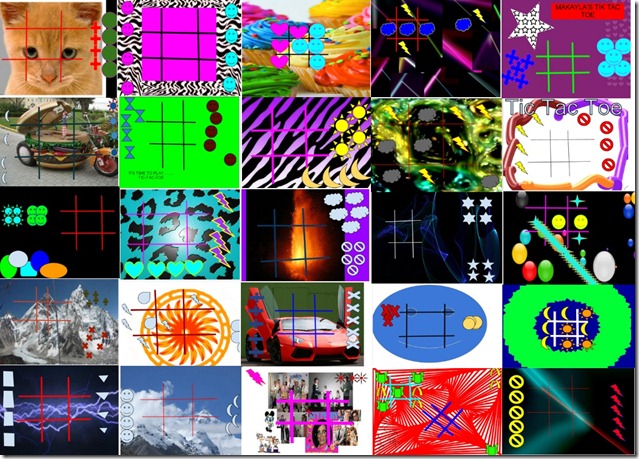
- Here are the steps:
- Create a new Drawing in your 103 Student Folder called 2.3 tictactoe
- Add a cool background for your game (like the student examples above). Here are some ideas for your background:
- insert an image from the web
- upload clipart from your clipart folder or from the Microsoft Clipart Site
- create your own background using Neave, Sumopaint, Flamepaint or Google Drawings
- Add lines for your gameboard (thick, brightly colored lines work best) and create 2 custom shapes with 5 copies of each:

- Here’s an example with a Neave Imagination background

- To play your game with someone, share your drawing by clicking the share button and typing the name of the person next to you

- Part 3) Help with today’s assignments! - (click-to-comment)
- Backgrounds Links for today’s assignment
- Part 4) Through? (click-to-comment)
- Checkout the forecast high temp for Wednesday… only 680


Tuesday 15th:
- Part 1) Review (click-to-comment)
- Please check your workstation for damages and report problems to me!
- Here’s what your 103 student folder should look like: (view example folder here)

- Daily Warmup Activity:
- Capture the image below with Skitch, find and highlight or circle the hidden Giraffe in this image, drag it into your 103 folder and rename it w9. Please don’t give the answer away!

- Daily Warmup Response: Use Skitch to capture and highlight the hidden giraffe in this image and save it as w9 in your 103 folder
- Check for new click-to-comments and my responses to them (blue highlights are new responses!): http://goo.gl/iA4mC

- Part 2) Objectives: Today students will… (click-to-comment)
- Explore this site to create cool looking images and backgrounds
- http://bomomo.com/

- Capture 4 different Bomomo creations and paste them in a new drawing called p5. Here’s an example of what that might look like:

- Here’s another p5 example. Please add a Wordart Title to your drawing like you see below.

- Make a copy of this Checkers Template, share it with someone next to you, and play one quick game of checkers with them
- Logon to your Drive: Logon link
- Click on this Template link: https://docs.google.com/a/bisdtx.org/drawings/d/1AMfGliqnTVbKIpWuY3ihQO0knNikjgivlf3k_vtc2I0/edit
- Follow these directions to make a copy of the template, then click the share button to share it
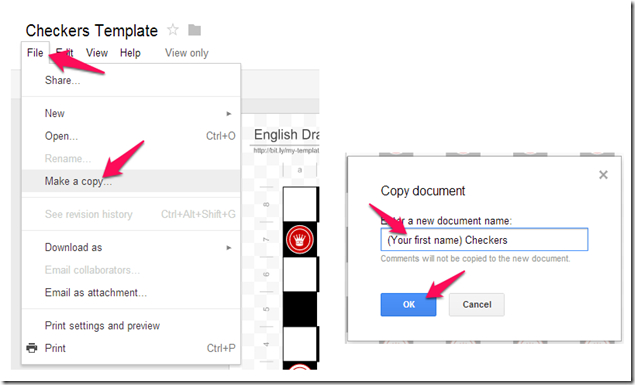
- Complete yesterday’s Tic-Tac-Toe Game assignment if you haven’t already done so using Google Drawings. Name your drawing 2.3 tictactoe
- Video demo: https://dl.dropboxusercontent.com/u/197021/Video%20Tutorials/Google%20Docs%20Intro%20videos/GDraw%203T%20demo.mp4
- Game Demo: http://goo.gl/4D24KS
- Here’s the example which I made to show you:
- Part 3) Help with today’s assignments! - (click-to-comment)
- Backgrounds Links for today’s assignment
- Part 4) Through? (click-to-comment)
- Checkout this list of weather records from Wikipedia


Wednesday 16th:
- Part 1) Review (click-to-comment)
- Please check your workstation for damages and report problems to me!
- Here’s what your 103 student folder should look like: (view example folder here)

- Daily Warmup Activity:
- What famous cartoon character does this picture sentence name? Once you figure it out, search for a picture of the character which you can capture with Skitch, drag it into your student folder and rename wu10 so it will sort correctly!

- Here’s the solution to yesterday’s warmup

- Daily Warmup Response: Search the web for a picture of the cartoon character from the picture puzzle which you can capture with Skitch, drag it into your student folder and rename wu10 so it will sort correctly!
- Check for new click-to-comments and my responses to them (blue highlights are new responses!): http://goo.gl/iA4mC


- Part 2) Objectives: Today students will… (click-to-comment)
- View Google Presentations Intro clip: https://dl.dropbox.com/u/197021/Google%20Docs%20Intro%20videos/Google%20Presentations.flv
- View 450 slide Google Presentations demo: https://dl.dropbox.com/u/197021/Google%20Docs%20Intro%20videos/Google_Demo_Slam_Epic_Docs_Animation.flv
- Create a new Presentation called 2.4 My Backgrounds which will teach us how to use Google Presentations, give us some backgrounds to use for projects in other subjects and help us to review programs which we’ve used before
- Slide 1: Here’s a video tutorial on how to make your title slide: https://dl.dropboxusercontent.com/u/197021/Video%20Tutorials/2.4%20Project%20Videos/2.4%20Slide%201%20Title%20Slide.mp4
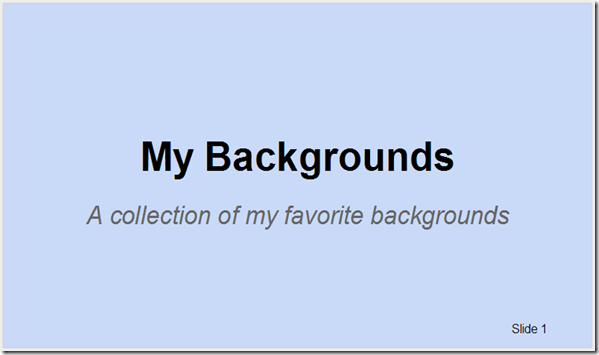
- We will add 4 slides today and 4 tomorrow to complete the project
- Each content slide should have 4 things on it:
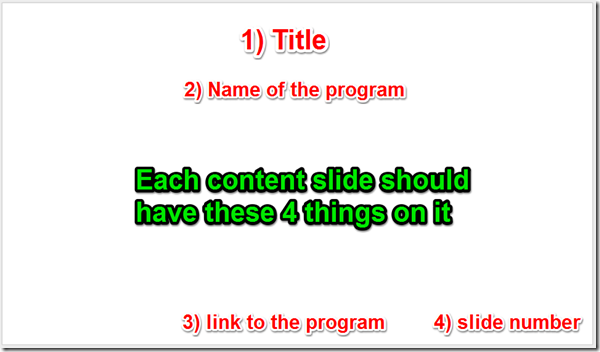
- Here’s the list of content slides you should have in your presentation with video demos of how to complete each slide:
- Slide 2: Flamepaint
- Slide 3: A Clipart Scene
- Slide 4: A Tagxedo word cloud text title using any simple black and white image of your favorite subject area (you can Skitch any of the examples below from this link): https://docs.google.com/folder/d/0BxVuH-KD_XBfUjl6V3I4VHJ1aTQ/edit?usp=sharing
- Part 3) Help with today’s assignments! - (click-to-comment)
- Links for today
- Flamepaint: http://www.escapemotions.com/experiments/flame/#top
- Clipart (new link): http://office.microsoft.com/en-us/images/results.aspx?qu=
- Tagxedo: http://www.tagxedo.com/app.html
- Other links which might be helpful to you
- Gzaas Name Pattern: http://gzaas.com/RHg6u
- Video demos for each of the slides
- Slide 1 title slide: https://dl.dropboxusercontent.com/u/197021/Video%20Tutorials/2.4%20Project%20Videos/2.4%20Slide%201%20Title%20Slide.mp4
- Slide 2 Flamepaint: https://dl.dropboxusercontent.com/u/197021/Video%20Tutorials/2.4%20Project%20Videos/2.4%20Slide%202%20Flamepaint.mp4
- Slide 3 Clipart: https://dl.dropboxusercontent.com/u/197021/Video%20Tutorials/2.4%20Project%20Videos/2.4%20Slide%203%20Clipart.mp4
- Slide 4 Tagxedo: https://dl.dropboxusercontent.com/u/197021/Video%20Tutorials/2.4%20Project%20Videos/2.4%20Slide%204%20Tagxedo.mp4
- Part 4) Through? (click-to-comment)
- Check your grades in all classes. The 2nd Progress Reporting Period ends this Friday!
- Here’s the current weather radar: http://www.wunderground.com/wundermap/?lat=30.11580086&lon=-97.27464294&zoom=10


Thursday 17th:
- Part 1) Review (click-to-comment)
- Please check your workstation for damages and report problems to me!
- Here’s what your 103 student folder should look like: (view example folder here)

- Daily Warmup Activity:
- Find your favorite Halloween Doodle from the link below and Skitch it to your 103 folder as wu11
- The solution to yesterday’s warmup is: Mickey Mouse
- Daily Warmup Response: Skitch your favorite Halloween Doodle to your folder as wu11
- Check for new click-to-comments and my responses to them (blue highlights are new responses!): http://goo.gl/iA4mC

- Part 2) Objectives: Today students will… (click-to-comment)
- View a recording of a Halloween Doodle: https://dl.dropboxusercontent.com/u/197021/Videos%20%28edited%29/Google%20Doodle%20Halloween%202012.mp4
- Try this new pumpkin carving site and compare it to the one we’ve used before. Use your favorite on slide 8 for today:
- http://spookathon.com/halloween/pumpkin-carver.php (best for light background slide 8)
- http://www.theoworlds.com/halloween/ (best for dark background slide 8)
- Complete your 2.4 My Backgrounds presentation by adding these last 4 slides
- Slide 5: A Neave interactive
- Slide 6: A Bomomo creation
- Slide 7: A Sumo cube or sphere
- Slide 8: A pumpkin carving using your favorite of the 2 sites below
- Part 3) Help with today’s assignments! - (click-to-comment)
- Links for today
- Flamepaint: http://www.escapemotions.com/experiments/flame/#top
- Clipart (new link): http://office.microsoft.com/en-us/images/results.aspx?qu=
- Tagxedo: http://www.tagxedo.com/app.html
- Neave: http://neave.com/
- Bomomo: http://bomomo.com/
- Sumo: http://www.sumo.fm/#create
- Pumpkin carvers
- Other links which might be helpful to you
- Gzaas Name Pattern: http://gzaas.com/RHg6u
- Video demos for each of the slides
- Slide 1 title slide: https://dl.dropboxusercontent.com/u/197021/Video%20Tutorials/2.4%20Project%20Videos/2.4%20Slide%201%20Title%20Slide.mp4
- Slide 2 Flamepaint: https://dl.dropboxusercontent.com/u/197021/Video%20Tutorials/2.4%20Project%20Videos/2.4%20Slide%202%20Flamepaint.mp4
- Slide 3 Clipart: https://dl.dropboxusercontent.com/u/197021/Video%20Tutorials/2.4%20Project%20Videos/2.4%20Slide%203%20Clipart.mp4
- Slide 4 Tagxedo: https://dl.dropboxusercontent.com/u/197021/Video%20Tutorials/2.4%20Project%20Videos/2.4%20Slide%204%20Tagxedo.mp4
- Slide 5 Neave: https://dl.dropboxusercontent.com/u/197021/Video%20Tutorials/2.4%20Project%20Videos/2.4%20Slide%205%20Neave.mp4
- Slide 6 Bomomo: https://dl.dropboxusercontent.com/u/197021/Video%20Tutorials/2.4%20Project%20Videos/2.4%20Slide%206%20Bomomo.mp4
- Slide 7 Sumo: https://dl.dropboxusercontent.com/u/197021/Video%20Tutorials/2.4%20Project%20Videos/2.4%20Slide%207%20Sumo.mp4
- Slide 8 Pumpkin Carvers: https://dl.dropboxusercontent.com/u/197021/Video%20Tutorials/2.4%20Project%20Videos/2.4%20Slide%208%20Carver.mp4
- Part 4) Through? (click-to-comment)
- Check your grades in all classes. The 2nd Progress Reporting Period ends tomorrow!
- Wow… check out our recent visitors list this morning!


Friday 18th: Folder checks every Friday!
- Part 1) Review (click-to-comment)
- Please check your workstation for damages and report problems to me!
- Here’s what your 103 student folder should look like: (view example folder here)

- Friday Warmup Activity:
- Please complete the Weekly Reflections Form for this week!
- Check for new click-to-comments and my responses to them (blue highlights are new responses!): http://goo.gl/iA4mC

- Part 2) Objectives: Today students will… (click-to-comment)
- Complete your 2.4 My Backgrounds Project which is due today! It should look something like this example:
- View the video clips selection for this week
- Part 3) Help with today’s assignments! - (click-to-comment)
- Links for today
- Flamepaint: http://www.escapemotions.com/experiments/flame/#top
- Clipart (new link): http://office.microsoft.com/en-us/images/results.aspx?qu=
- Tagxedo: http://www.tagxedo.com/app.html
- Neave: http://neave.com/
- Bomomo: http://bomomo.com/
- Sumo: http://www.sumo.fm/#create
- Pumpkin carvers
- Other links which might be helpful to you
- Gzaas Name Pattern: http://gzaas.com/RHg6u
- Video demos for each of the slides
- Slide 1 title slide: https://dl.dropboxusercontent.com/u/197021/Video%20Tutorials/2.4%20Project%20Videos/2.4%20Slide%201%20Title%20Slide.mp4
- Slide 2 Flamepaint: https://dl.dropboxusercontent.com/u/197021/Video%20Tutorials/2.4%20Project%20Videos/2.4%20Slide%202%20Flamepaint.mp4
- Slide 3 Clipart: https://dl.dropboxusercontent.com/u/197021/Video%20Tutorials/2.4%20Project%20Videos/2.4%20Slide%203%20Clipart.mp4
- Slide 4 Tagxedo: https://dl.dropboxusercontent.com/u/197021/Video%20Tutorials/2.4%20Project%20Videos/2.4%20Slide%204%20Tagxedo.mp4
- Slide 5 Neave: https://dl.dropboxusercontent.com/u/197021/Video%20Tutorials/2.4%20Project%20Videos/2.4%20Slide%205%20Neave.mp4
- Slide 6 Bomomo: https://dl.dropboxusercontent.com/u/197021/Video%20Tutorials/2.4%20Project%20Videos/2.4%20Slide%206%20Bomomo.mp4
- Slide 7 Sumo: https://dl.dropboxusercontent.com/u/197021/Video%20Tutorials/2.4%20Project%20Videos/2.4%20Slide%207%20Sumo.mp4
- Slide 8 Pumpkin Carvers: https://dl.dropboxusercontent.com/u/197021/Video%20Tutorials/2.4%20Project%20Videos/2.4%20Slide%208%20Carver.mp4
- Part 4) Through? (click-to-comment)
- Check your grades in all classes. The 2nd Progress Reporting Period ends today!


