Week1 (s14): Jan 6th–Jan 10th

Highlights for the week: 

  • View the BMS Public Calendar for this weeks events!
  • Tip: Use ctrl+F and enter the date (like 1st, 2nd, 3rd, 4th, etc.) to jump quickly to the Blog entry for today!
  • Some notes for Parents/Guardians who view this Blog:
    • Everything we do in this class is listed on this Blog (so students who are absent can easily find what they’ve missed and even complete it while they are absent!)
    • Nearly every assignment can be completed at home or anywhere with an internet connection (use the Paint program or a Google Drawing rather than ‘Interwrite’ where you see it on this Blog)
    • Friday’s are makeup days so students who have trouble completing assignments have this extra time every week to get caught up!
    • You can see examples of every project we do at this Public Examples Folder Link

Monday 6th: Student Holiday!

Try to stay warm on your last day of the Winter Break!

  • image

    Tuesday 7th:

    - Part 1) Review   (click-to-comment)

    1. Logon information handed out (if you need it)
    2. Please check your workstation for damages and report problems to me!
    3. Logon information handed out (if you need it)
    4. We will use the Chrome web browser in this class
      • The icon to launch Chrome looks something like this:
      • image
      • If you don’t see it on your desktop, look in Start/Programs
      • Please open Chrome!
    5. Check your grades for the 1st Semester in all classes while we wait for everyone to get logged on to their computers
    6. Daily Warmup Activity: 
    7. Daily Warmup Response: no response needed today!
    8. Check the last few click-to-comments from last semester and my responses to them: http://goo.gl/TU5uol

    - Part 2) Objectives: Today students will… (click-to-comment)

    1. View the Day1 Course Overview Prezi (Presentation): 
    2. Introduce Skitch, a screen capture and annotation tool which we will use more than any other program in this class 
    3. Introduce and explore Gzaas, a colorful full-screen message application 

    - Part 3) Help with today’s assignments! - (click-to-comment)

    1. Day1 overview video:  
    2. View the Skitch for Windows Desktop Guide
    3. Video help with Skitch 
    4. Video help with Gzaas

    - Part 4) Through?   (click-to-comment)

    1. View the weather forecast for today:  http://goo.gl/GYTLNk
      • image
    2. Checkout our BMS Bell Schedule (regular day) in case you’ve forgotten when your classes start and end:
    3. [Screenshot_082513_034945_AM%255B6%255D.jpg]

      Wednesday 8th:

      - Part 1) Review   (click-to-comment)

      1. Please check your workstation for damages and report problems to me!
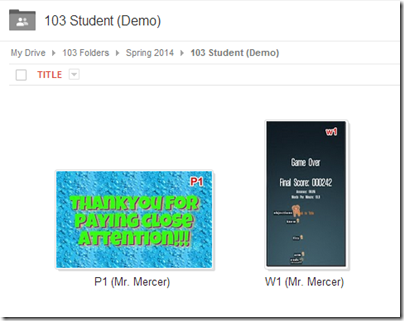
      2. Here’s what your 103 student folder should look like after today: (view example folder here)
        • image
      3. Here’s a thank you message for you all!  
        • Screenshot_010814_051801_AM
      4. Daily Warmup Activity:  
        • Try this typing game again for todays warmup
        • Capture your score with Skitch and drag it to your desktop
      5. Daily Warmup Response:  Capture your score with Skitch and drag it to your desktop
      6. Check for new click-to-comments and my responses to them (blue highlights are new responses!): http://goo.gl/TU5uol

      - Part 2) Objectives: Today students will… (click-to-comment)

      1. Open your 103 Drive folder from an email which I sent you 
      2. Upload your warmup file from your desktop to your 103 Drive folder and rename it W1 (for Warmup 1) 
      3. Create a Gzaas to say thank you to someone important in your life or for something which is important to you

      - Part 3) Help with today’s assignments! - (click-to-comment)

      1. Video help for todays assignments

      - Part 4) Through?   (click-to-comment)

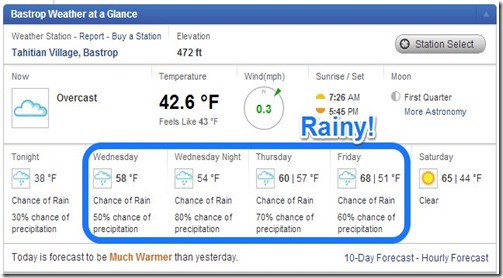
      1. Checkout our rainy forecast for the next few days
        • Screenshot_010814_022420_AM

        Thursday 9th:

        - Part 1) Review   (click-to-comment)

        1. Please check your workstation for damages and report problems to me!
        2. Logon here to get to your Gmail
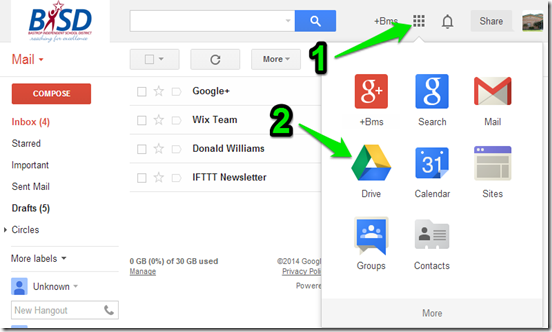
        3. To get to your 103 Drive from Gmail, follow these steps: Logon to Gmail (above) and then 1) click on the 9 little boxes symbol and 2) click on the Drive icon 
          • image
        4. Here’s what your 103 student folder should look like after today’s warmup: (view example folder here)
          • image
          • Daily Warmup Activity: 
            • Try this picture memory game and Skitch your score into your 103 Drive folder as W2.  
          • Daily Warmup Response:  Skitch your score into your 103 Drive folder as W2
          • Here are our first two click-to-comments and my responses to them (blue highlights are new responses!): http://goo.gl/TU5uol

          - Part 2) Objectives: Today students will… (click-to-comment)

          1. Practice an easier way to jump to today’s date on 308 Today, or to find any text on a website or most documents
            • Scroll to the top of the page and look for this
              • Tip: Use ctrl+F and enter the date (like 1st, 2nd, 3rd, 4th, etc.) to jump quickly to the Blog entry for today!
            • Use ctrl+F and enter 9th since that’s the date today… your screen should jump down to today
            • image
          2. Practice using ctrl+F to find the following (copy and paste the blue text below into the ctrl+f search window):
            • The words Logon Links 
            • (Take a guess before you try this… you might be surprised) How many times the letter v shows up on this page
            • pivot installation so you can download it at home if you are allowed to
          3. Try using Chrome to do these tasks for you (copy and paste the blue text into a new tab) or highlight, right-click, and choose Search Google
            • image
            • As a timer:  timer 5 seconds
            • As a calculator: 85 x 15 =
            • As a dictionary: Define amuse
            • As a map: Seattle map
            • As a translator (this one you have to copy and paste in a new tab): translate hello how are you
              • image
            • For many other special types of Google Searchers: http://www.google.com/help/features.html
          4. View some Pivot Demos
          5. Try the following to make Pivot more fun and interesting
            • View sample animations
              • image
            • Add a custom background (like the movie scene)
              • SNAGHTML1225f44
            • Add letters or other figures
              • SNAGHTML1234a0f
            • Create your own custom figure
              • SNAGHTML1246962
            • Add colors, resize and flip your characters
              • SNAGHTML125a71d
          6. Launch the Pivot program from your desktop or Start/Programs menu and create a Pivot animation for fun and practice
            • Screenshot_082713_061318_AM

          - Part 3) Help with today’s assignments! - (click-to-comment)

          1. Here are some installation files if you’re allowed to install your own programs at home

          - Part 4) Through?   (click-to-comment)

          1. Checkout our campus website

            Friday 10th: Folder checks every Friday!

            - Part 1) Review   (click-to-comment)

            1. Please check your workstation for damages and report problems to me!
            2. Logon here to get to your Gmail
            3. Here’s what your 103 student folder should look like: (view example folder here) 
              • image
              • Friday Warmup Activity: 
                • Please complete the Weekly Reflections Form for this week! 
              • Check for new click-to-comments and my responses to them (blue highlights are new responses!): http://goo.gl/TU5uol

                - Part 2) Objectives: Today students will… (click-to-comment)

                1. Check all student 103 Drives to see if everyone has the following 3 assignments in them (view example folder here)   
                  • image
                2. View the video clips selection for this week 

                - Part 3) Help with today’s assignments! - (click-to-comment)

                1. Here are the installation files again if you’re allowed to install your own programs at home

                - Part 4) Through?   (click-to-comment)

                1. Checkout our District Calendar to see when our next day off is (click on the calendar image for a larger view) 
                  • image

                Week16: Dec 16th–Dec 20th

                Highlights for the week: 

                • View the BMS Public Calendar for this weeks events!
                • Tip: Use ctrl+F and enter the date (like 1st, 2nd, 3rd, 4th, etc.) to jump quickly to the Blog entry for today!
                • Some notes for Parents/Guardians who view this Blog:
                  • Everything we do in this class is listed on this Blog (so students who are absent can easily find what they’ve missed and even complete it while they are absent!)
                  • Nearly every assignment can be completed at home or anywhere with an internet connection (use the Paint program or a Google Drawing rather than ‘Interwrite’ where you see it on this Blog)
                  • Friday’s are makeup days so students who have trouble completing assignments have this extra time every week to get caught up!
                  • You can see examples of every project we do at this Public Examples Folder Link

                Monday 16th through Thursday 19th:

                - Part 1) Review   (click-to-comment)

                1. Please check your workstation for damages and report problems to me!
                2. Here’s what your final 103 student folder should look like: (view example folder here)
                  • image
                  • Important Information concerning this week: I want you relax and enjoy this class period during a tense week of midterm exams and district assessments, but please keep the following in mind: 
                    1. You will receive a behavior/participation grade this week
                    2. Classroom rules regarding staying in your seats during class, not eating or drinking in the lab and being polite still apply!
                    3. Your access to your account depends on how well you follow 1 & 2 above! 
                    4. Please end this course on a positive note! 
                  • Here’s an Activities Page with lots of things to do and explore!
                  • Check for new click-to-comments and my responses to them (blue highlights are new responses!): http://goo.gl/iA4mC

                  - Part 2) Objectives: Today students will… (click-to-comment)

                  Here’s how you rated this course overall (which is great news for me!): 

                  • image
                  • …and here are your ratings compared to previous semesters:

                  image 

                  1. Please complete your final project! (let me know if you are having technical issues and I’ll try to help you as best as I can)
                  2. If you made a Prezi for your final project, you’ll need to share a link to it with me (you can do this anytime, even if it is not yet finished!). Follow the directions below and paste your link in the box… then click Submit
                    1. Here’s my Final Project Fall 2013 Example  
                      •  

                  - Part 3) Help with your final project! - (click-to-comment)

                  1. Links for this project 
                  2. Slides by day (slides for today are highlighted in green)
                    1. Mon 2nd: 1R) Gzaas – http://gzaas.com/
                    2. Mon 2nd: 1N) 3D Tin – http://www.3dtin.com
                    3. Tues 3rd: 2R) Flamepainter - http://www.escapemotions.com/experiments/flame/
                    4. Tues 3rd: 2N) Draw.io - https://www.draw.io/?picker=0
                    5. Wed 4th: 3R) Photovisi - http://www.photovisi.com/collage/choose_template/wallpapers
                    6. Wed 4th: 3N) Wix - http://www.wix.com/
                    7. Thurs 5th: 4R) Screencast-o-matic - http://www.screencast-o-matic.com/
                    8. Thurs 5th: 4N) Draw-a-stickman - http://www.drawastickman.com/
                    9. Mon 9th: 5R) Sumo.fm - http://www.sumo.fm/#create
                    10. Mon 9th: 5N) Floorplanner - http://floorplanner.com/
                    11. Tues 10th: 6R) Wordle or Tagxedo - http://www.wordle.net/create or http://www.tagxedo.com/app.html 
                    12. Tues 10th: 6N) Bubblr - http://www.pimpampum.net/bubblr/index.php
                    13. Thurs 12th: 7R) Backgrounds: http://neave.com/ or http://bomomo.com/ or http://weavesilk.com/
                    14. Thurs 12th: 7N) Glogster: http://edu.glogster.com/
                  3. Here’s my example Prezi Project 

                  - Part 4) Through?   (click-to-comment)

                  1. Check your grades in all classes. We’re very near the end of the 1st Semester!
                  2. Please consider signing my digital yearbook! 

                    Friday 20th:  Last day of the First Semester!

                    1. Here’s the bell schedule for Friday’s assembly and early release:

                    image

                    image

                    DSC_0445-TWINKLE

                      • Something to think about  :) 
                      • image

                    Week15: Dec 9th–Dec 13th

                    Highlights for the week: 

                    • View the BMS Public Calendar for this weeks events!
                    • Tip: Use ctrl+F and enter the date (like 1st, 2nd, 3rd, 4th, etc.) to jump quickly to the Blog entry for today!
                    • Some notes for Parents/Guardians who view this Blog:
                      • Everything we do in this class is listed on this Blog (so students who are absent can easily find what they’ve missed and even complete it while they are absent!)
                      • Nearly every assignment can be completed at home or anywhere with an internet connection (use the Paint program or a Google Drawing rather than ‘Interwrite’ where you see it on this Blog)
                      • Friday’s are makeup days so students who have trouble completing assignments have this extra time every week to get caught up!
                      • You can see examples of every project we do at this Public Examples Folder Link

                    Monday 9th:

                    - Part 1) Review   (click-to-comment)

                    1. Please check your workstation for damages and report problems to me!
                    2. Here’s what your 103 student folder should look like: (view example folder here)
                      • image
                      • Daily Warmup Activity: 
                      • Daily Warmup Response: Skitch your score to your 103 Drive as wu15 
                      • Check for new click-to-comments and my responses to them (blue highlights are new responses!): http://goo.gl/iA4mC

                      - Part 2) Objectives: Today students will… (click-to-comment)

                      1. Here’s how you rated last week’s programs and activities: 
                        • image
                      2. Continue our Final Project Fall 2013 with our 2 slides for today:
                        • Remember, each slide must have these 4 things:
                          1. The name of the program
                          2. A link to the program
                          3. A new example made using the program
                          4. A star rating (1-5) with a reason for your rating
                        • 5R) Sumo.fm
                          1. http://www.sumo.fm/#create
                          2. Create a cube, sphere or cylinder of a winter or Christmas scene
                          3. Challenge: Can you create your shape with a transparent background like the example below?
                          4. Here’s my example
                          5. image
                        • 5N) Floorplanner
                          1. http://floorplanner.com/
                          2. Create or modify a floorplan of of a room or place that you would like to live in!
                          3. If you want to save your work, you’ll need to create an account… otherwise, modify the demo version (but Skitch it immediately after you make your changes because you won’t be able to save them!)
                          4. image
                          5. Here’s my example
                          6. image

                      - Part 3) Help with today’s assignments! - (click-to-comment)

                      1. Links for this project 
                      2. Slides by day (slides for today are highlighted in green)
                        1. Mon 2nd: 1R) Gzaas – http://gzaas.com/
                        2. Mon 2nd: 1N) 3D Tin – http://www.3dtin.com
                        3. Tues 3rd: 2R) Flamepainter - http://www.escapemotions.com/experiments/flame/
                        4. Tues 3rd: 2N) Draw.io - https://www.draw.io/?picker=0
                        5. Wed 4th: 3R) Photovisi - http://www.photovisi.com/collage/choose_template/wallpapers
                        6. Wed 4th: 3N) Wix - http://www.wix.com/
                        7. Thurs 5th: 4R) Screencast-o-matic - http://www.screencast-o-matic.com/
                        8. Thurs 5th: 4N) Draw-a-stickman - http://www.drawastickman.com/
                        9. Mon 9th: 5R) Sumo.fm - http://www.sumo.fm/#create
                        10. Mon 9th: 5N) Floorplanner - http://floorplanner.com/
                      3. Here’s my example Prezi Project 

                      - Part 4) Through?   (click-to-comment)

                      1. Checkout any of these interactive Google Doodles!

                        Tuesday 10th:

                        - Part 1) Review   (click-to-comment)

                        1. Please check your workstation for damages and report problems to me!
                        2. Here’s what your 103 student folder should look like: (view example folder here)
                          • image
                          • Daily Warmup Activity: 
                            • Skitch the most interesting or daring activity (in your opinion) into your 103 Drive as wu16 
                          • Daily Warmup Response: Skitch the most interesting or daring activity to you into your 103 Drive as wu16 
                          • Check for new click-to-comments and my responses to them (blue highlights are new responses!): http://goo.gl/iA4mC

                          - Part 2) Objectives: Today students will… (click-to-comment)

                          1. Continue our Final Project Fall 2013 with our 2 slides for today:
                            • Remember, each slide must have these 4 things:
                              1. The name of the program
                              2. A link to the program
                              3. A new example made using the program
                              4. A star rating (1-5) with a reason for your rating

                          - Part 3) Help with today’s assignments! - (click-to-comment)

                          1. Links for this project 
                          2. Slides by day (slides for today are highlighted in green)
                            1. Mon 2nd: 1R) Gzaas – http://gzaas.com/
                            2. Mon 2nd: 1N) 3D Tin – http://www.3dtin.com
                            3. Tues 3rd: 2R) Flamepainter - http://www.escapemotions.com/experiments/flame/
                            4. Tues 3rd: 2N) Draw.io - https://www.draw.io/?picker=0
                            5. Wed 4th: 3R) Photovisi - http://www.photovisi.com/collage/choose_template/wallpapers
                            6. Wed 4th: 3N) Wix - http://www.wix.com/
                            7. Thurs 5th: 4R) Screencast-o-matic - http://www.screencast-o-matic.com/
                            8. Thurs 5th: 4N) Draw-a-stickman - http://www.drawastickman.com/
                            9. Mon 9th: 5R) Sumo.fm - http://www.sumo.fm/#create
                            10. Mon 9th: 5N) Floorplanner - http://floorplanner.com/
                            11. Tues 10th: 6R) Wordle or Tagxedo - http://www.wordle.net/create or http://www.tagxedo.com/app.html 
                            12. Tues 10th: 6N) Bubblr - http://www.pimpampum.net/bubblr/index.php
                          3. Here’s my example Prezi Project 

                          - Part 4) Through?   (click-to-comment)

                          1. Check your grades in all classes. We’re very near the end of the 1st Semester!
                          2. Checkout the forecast… looks like more cool, damp weather in store for Friday
                            • image

                            Wednesday 11th: Today is a STAAR practice testing day. We will continue with our project work tomorrow!

                              Thursday 12th:

                              - Part 1) Review   (click-to-comment)

                              1. Please check your workstation for damages and report problems to me!
                              2. Here’s what your 103 student folder should look like: (view example folder here) 
                                • image
                                • Daily Warmup Activity: 
                                  • Try a few of these Unsnarl-It puzzles and Skitch your highest puzzle result into your 103 Drive as wu17 
                                    • http://unsnarl-it.jonasjuffinger.com/
                                    • Drag the green dots around so that none of the lines cross. Line are orange when they intersect and they change to blue when they don’t.
                                    • Here’s my example
                                    • image 
                                • Daily Warmup Response: Skitch your highest puzzle result into your 103 Drive as wu17
                                • Check for new click-to-comments and my responses to them (blue highlights are new responses!): http://goo.gl/iA4mC

                                  - Part 2) Objectives: Today students will… (click-to-comment)

                                  1. Continue our Final Project Fall 2013 with our last 2 slides for today:
                                    • Remember, each slide must have these 4 things:
                                      1. The name of the program
                                      2. A link to the program
                                      3. A new example made using the program
                                      4. A star rating (1-5) with a reason for your rating

                                  - Part 3) Help with today’s assignments! - (click-to-comment)

                                  1. Links for this project 
                                  2. Slides by day (slides for today are highlighted in green)
                                    1. Mon 2nd: 1R) Gzaas – http://gzaas.com/
                                    2. Mon 2nd: 1N) 3D Tin – http://www.3dtin.com
                                    3. Tues 3rd: 2R) Flamepainter - http://www.escapemotions.com/experiments/flame/
                                    4. Tues 3rd: 2N) Draw.io - https://www.draw.io/?picker=0
                                    5. Wed 4th: 3R) Photovisi - http://www.photovisi.com/collage/choose_template/wallpapers
                                    6. Wed 4th: 3N) Wix - http://www.wix.com/
                                    7. Thurs 5th: 4R) Screencast-o-matic - http://www.screencast-o-matic.com/
                                    8. Thurs 5th: 4N) Draw-a-stickman - http://www.drawastickman.com/
                                    9. Mon 9th: 5R) Sumo.fm - http://www.sumo.fm/#create
                                    10. Mon 9th: 5N) Floorplanner - http://floorplanner.com/
                                    11. Tues 10th: 6R) Wordle or Tagxedo - http://www.wordle.net/create or http://www.tagxedo.com/app.html 
                                    12. Tues 10th: 6N) Bubblr - http://www.pimpampum.net/bubblr/index.php
                                    13. Thurs 12th: 7R) Backgrounds: http://neave.com/ or http://bomomo.com/ or http://weavesilk.com/
                                    14. Thurs 12th: 7N) Glogster: http://edu.glogster.com/
                                  3. Here’s my example Prezi Project 

                                  - Part 4) Through?   (click-to-comment)

                                  1. Checkout these example Glogs by browsing the Glogpedia

                                    Friday 13th:  Folder checks every Friday!

                                    - Part 1) Review   (click-to-comment)

                                    1. Please check your workstation for damages and report problems to me!
                                    2. Here’s what your 103 student folder should look like: (view example folder here) 
                                      • image
                                      • image
                                      • Friday Warmup Activity: 
                                        • Please complete the Weekly Reflections Form for this week! 
                                      • Check for new click-to-comments and my responses to them (blue highlights are new responses!): http://goo.gl/iA4mC

                                        - Part 2) Objectives: Today students will… (click-to-comment)

                                        1. Complete our Final Project Fall 2013 if you haven’t already done so:
                                          • Remember, each slide must have these 4 things:
                                            1. The name of the program
                                            2. A link to the program
                                            3. A new example made using the program
                                            4. A star rating (1-5) with a reason for your rating
                                        2. If you made a Prezi for your final project, you’ll need to share a link to it with me (you can do this even if it is not yet finished!). Follow the directions below and paste your link in the box… then click Submit
                                        3. Here’s my Final Project Fall 2013 Example  
                                        4. View the video clips selection for today

                                        - Part 3) Help with today’s assignments! - (click-to-comment)

                                        1. Links for this project 
                                        2. Slides by day (slides for today are highlighted in green)
                                          1. Mon 2nd: 1R) Gzaas – http://gzaas.com/
                                          2. Mon 2nd: 1N) 3D Tin – http://www.3dtin.com
                                          3. Tues 3rd: 2R) Flamepainter - http://www.escapemotions.com/experiments/flame/
                                          4. Tues 3rd: 2N) Draw.io - https://www.draw.io/?picker=0
                                          5. Wed 4th: 3R) Photovisi - http://www.photovisi.com/collage/choose_template/wallpapers
                                          6. Wed 4th: 3N) Wix - http://www.wix.com/
                                          7. Thurs 5th: 4R) Screencast-o-matic - http://www.screencast-o-matic.com/
                                          8. Thurs 5th: 4N) Draw-a-stickman - http://www.drawastickman.com/
                                          9. Mon 9th: 5R) Sumo.fm - http://www.sumo.fm/#create
                                          10. Mon 9th: 5N) Floorplanner - http://floorplanner.com/
                                          11. Tues 10th: 6R) Wordle or Tagxedo - http://www.wordle.net/create or http://www.tagxedo.com/app.html 
                                          12. Tues 10th: 6N) Bubblr - http://www.pimpampum.net/bubblr/index.php
                                          13. Thurs 12th: 7R) Backgrounds: http://neave.com/ or http://bomomo.com/ or http://weavesilk.com/
                                          14. Thurs 12th: 7N) Glogster: http://edu.glogster.com/
                                        3. Here’s my example Prezi Project 

                                        - Part 4) Through?   (click-to-comment)

                                        1. Check your grades in all classes. We’re very near the end of the 1st Semester!